Magerquark.de

Repair broken TortoiseSVN Explorer Overlay Icons on Windows 7 64-bit

Symptom

The cute litte Windows Explorer Shell Overlay Icons of TortoiseSVN (you know those red, green, blue, etc. icons) that indicate the SVN state of your files or folders are missing.

Your are using a 64-bit version of Microsoft Windows 7.

Cause

The 64-bit versions of Windows 7 can only handle a total of 15 overlay icon handler.

Resolution

The resolution to edit the registry, as described in this article on Stack Overflow did not work on my machine.

What actually helped was that I updated to the latest version of TortoiseSVN and then used Autoruns from Sysinternals to remove all the Shell overlay icon identifiers except those of TortoiseSVN:
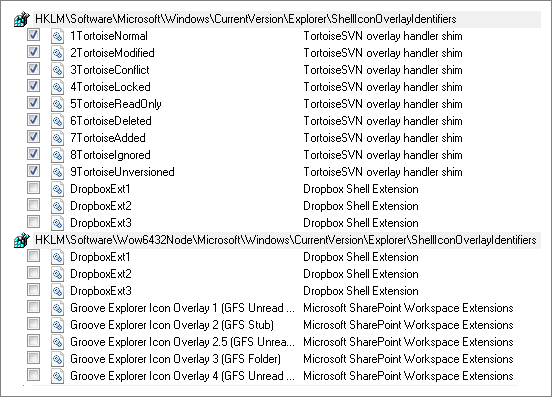
In my case there were lots of those ugly Groove entries (installed by Microsoft Office 2010) and some Dropbox entries.

After unchecking and rebooting my machine, the TortoiseSVN icons appeared again.

You can get Autoruns directly from the URL http://live.sysinternals.com/autoruns.exe without the need to install anything.

Kommentare

11 Kommentare zu „Repair broken TortoiseSVN Explorer Overlay Icons on Windows 7 64-bit“

  1. Avatar von Sven ohne Link
    Sven ohne Link

    Die Beschränkung auf15 Overlay-Symbolen gibt es auch auf 32-bit Systemen. Es hat nichts mit Windows 7 oder 64-bit zu tun.

  2. Avatar von Uwe Keim

    Ah, gut zu wissen, danke, Sven!

  3. Avatar von Bewerber
    Bewerber

    Machst dann da den Chef, Uwe ?

  4. Avatar von Uwe via iPhone

    Leider ned, Herr Bewerber.

  5. Avatar von mady
    mady

    Excellent!!!! this Worked

  6. Avatar von Ed
    Ed

    Works perfectly! Many thanks!

  7. Avatar von Sean
    Sean

    Unfortunately autoruns throws an error when I try to untick certain boxes, saying „Error changing item state: The system cannot find the file specified“ 🙁

  8. Avatar von CMS

    @Sean – Maybe you need to run the tool as Administrator?

  9. Avatar von Jisha
    Jisha

    Thanks, this worked for me.

  10. Avatar von cpaganin
    cpaganin

    The best!!!

Schreibe einen Kommentar

Deine E-Mail-Adresse wird nicht veröffentlicht. Erforderliche Felder sind mit * markiert

Diese Website verwendet Akismet, um Spam zu reduzieren. Erfahre, wie deine Kommentardaten verarbeitet werden.